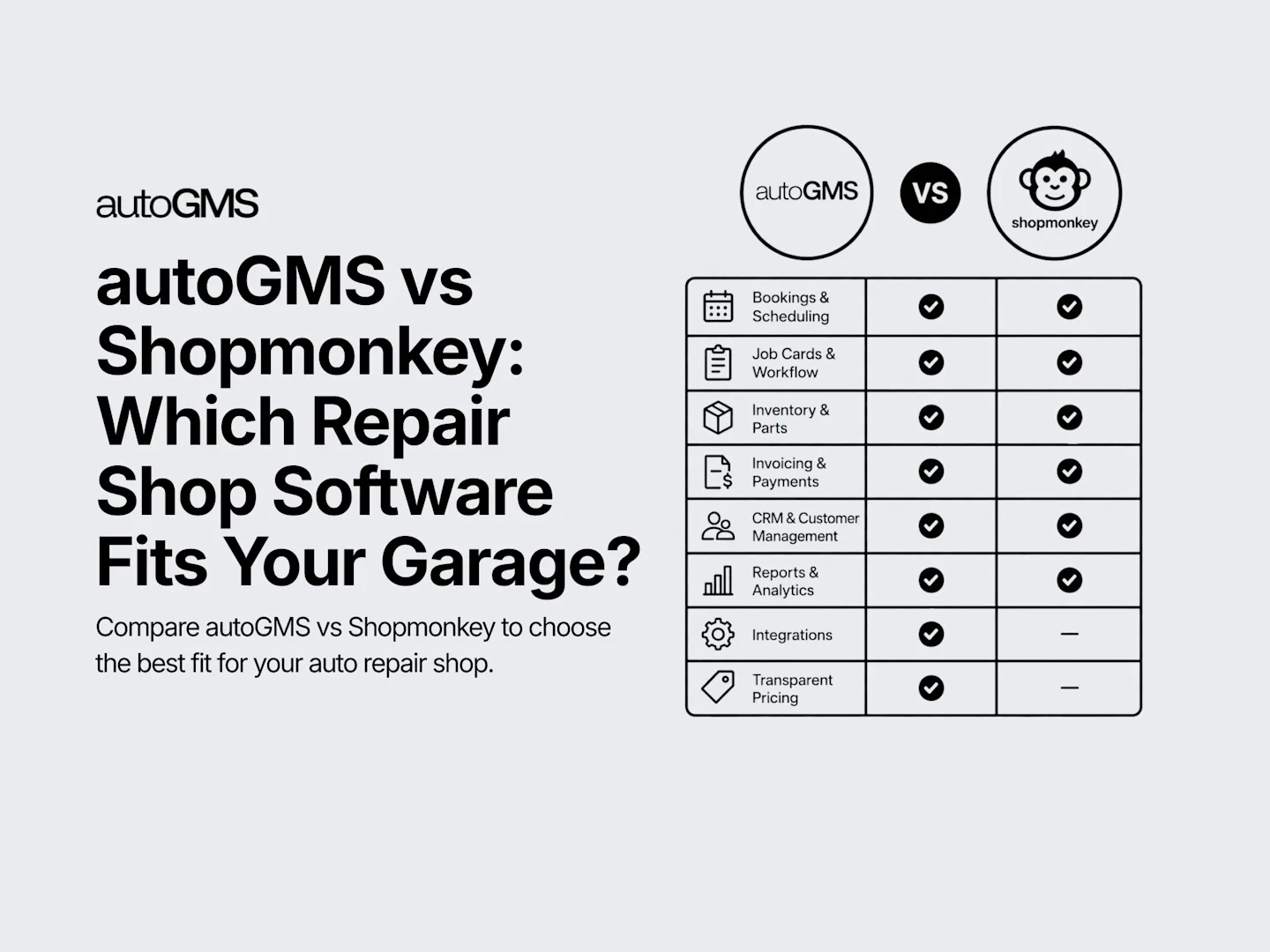
autoGMS vs Shopmonkey: Which Repair Shop Software Fits Your Garage?
Compare autoGMS vs Shopmonkey by features, pricing, bookings, workflow, inventory, integrations, support, and best fit for your repair shop.
On this page
This autoGMS vs shopmonkey comparison for auto repair shops is for garage owners choosing software before they buy. Both tools help manage repair work, customer communication, bookings, invoices, and daily shop operations.
Quick verdict: autoGMS is a strong fit for garages that want connected booking, job-card, technician, inventory, invoicing, reporting, and regional workflow tools in one platform. Shopmonkey is better suited to US repair shops looking for tiered plans, payments, messaging, and a broad integration ecosystem. The right choice depends on your location, shop size, workflow, required integrations, and total cost.
The right choice is not just the cheapest plan. You need software your team will use every day. Pricing matters, but workflow, setup, support, user limits, and best-fit use cases matter more.
If you are still mapping your software needs, read garage management software guide before comparing plans.
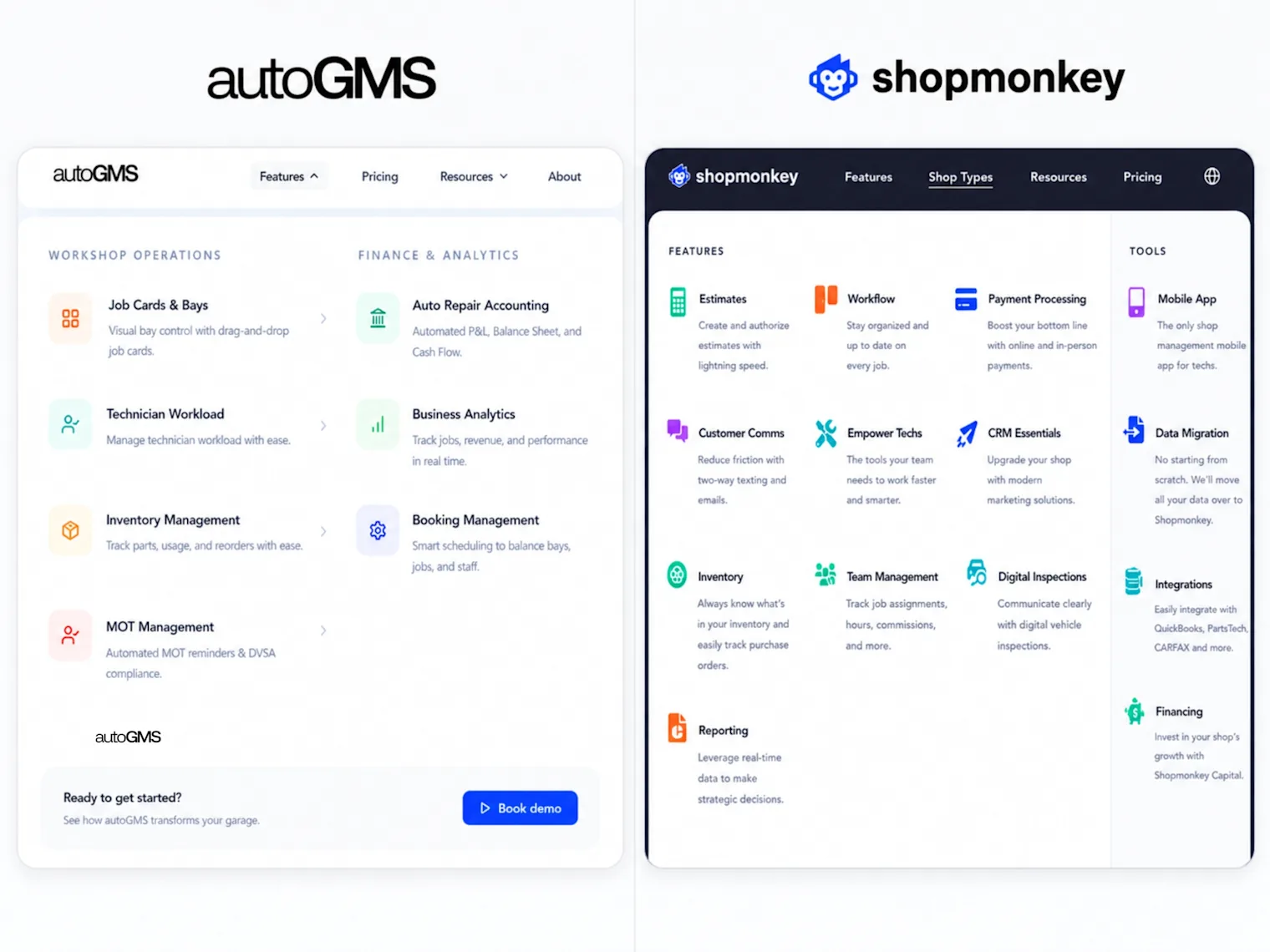
autoGMS vs shopmonkey comparison for auto repair shops
Both platforms cover the core needs of an auto repair shop. The main difference is how each system packages those tools. autoGMS keeps the experience simpler for independent and growing garages. Shopmonkey gives US shops a broader platform with more tiers, add-ons, integrations, and support options.
autoGMS is stronger if you want one clear system for bookings, job cards, bays, customers, inventory, invoicing, and expenses. Its pricing page also highlights no add-ons, no per-user fees, and a 14-day free trial.
Shopmonkey is stronger if you want a mature US-focused platform with deeper feature tiers. Its platform covers workflow, customer communication, estimates, invoices, payments, inspections, reporting, integrations, and multi-shop operations.
The main decision is not which tool has more features. The better question is which tool fits your daily workflow with less friction.
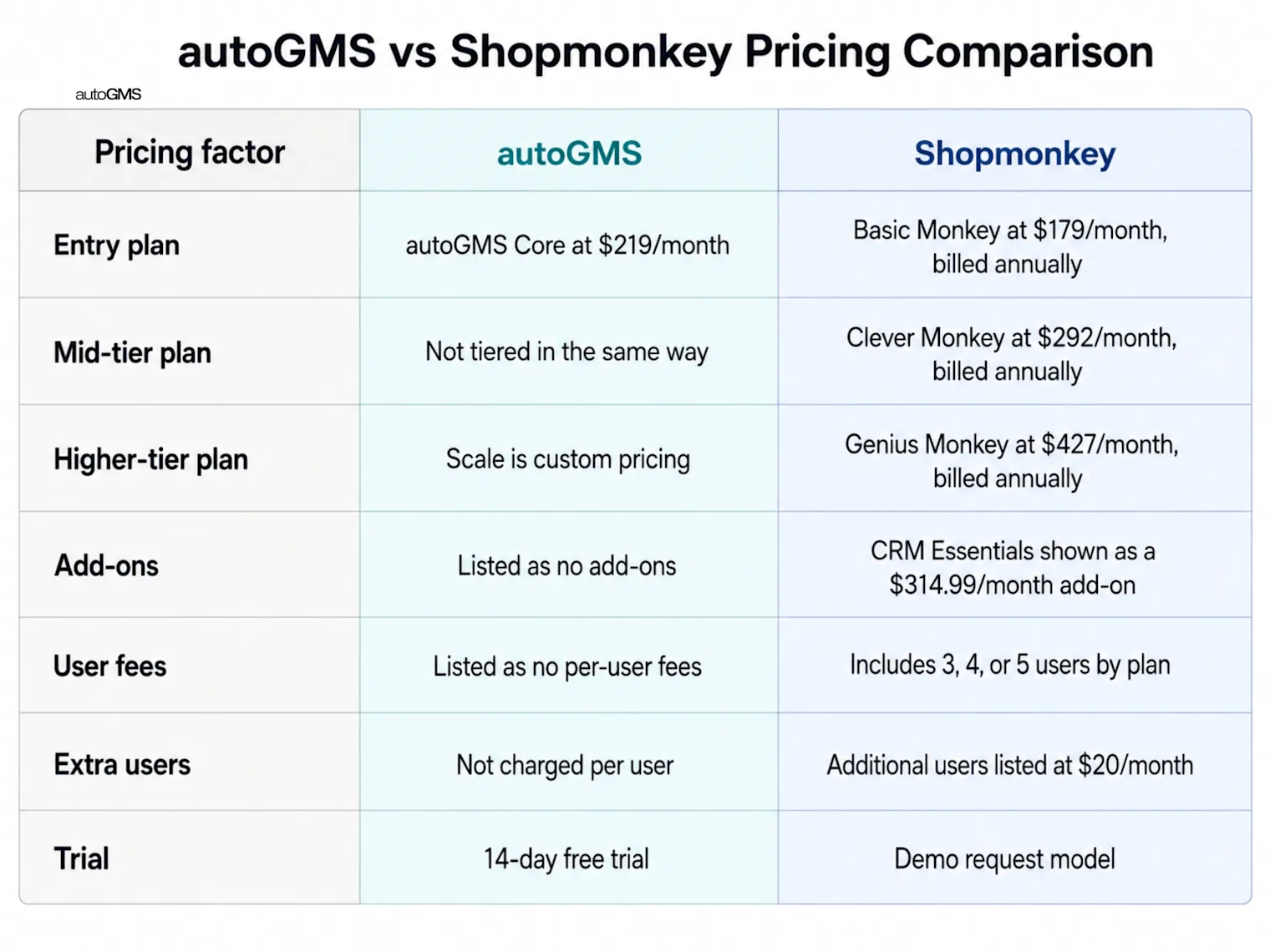
autoGMS vs Shopmonkey Pricing Comparison
autoGMS and Shopmonkey use different pricing approaches, so the starting monthly price does not tell the full story.
Shopmonkey currently publishes four pricing tiers. Its Basic plan starts at $239 per month, or $215 per month with annual billing. Clever starts at $399 monthly or $359 annually, while Genius starts at $499 monthly or $449 annually. Multi-Shop uses custom pricing. Additional users cost extra, and some accounting, CRM, bookkeeping, support, payment, and implementation services may add to the total cost.
For autoGMS, use the current pricing page or request a tailored quote based on your shop size, number of locations, selected features, integrations, messaging requirements, onboarding, and regional setup.
| Pricing factor | autoGMS | Shopmonkey |
| Starting price | Check current pricing or request a quote | Basic: $239/month or $215/month annually |
| Higher plans | Depends on shop requirements and selected setup | Clever: $399/month or $359 annually; Genius: $499/month or $449 annually |
| Multi-location pricing | Confirm based on number of locations and workflow requirements | Custom Multi-Shop pricing |
| Included users | Confirm based on the selected plan or quote | 3 users on Basic, 4 on Clever, 5 on Genius |
| Additional users | Confirm in the quote | $20 per additional user per month |
| CRM and marketing | Confirm which tools are included | Advanced CRM features may require Genius or a paid CRM add-on |
| Accounting | Confirm included tools and integrations | Built-in accounting and bookkeeping are available as paid add-ons |
| Payment processing | Confirm available payment options and fees | Online and in-person transaction fees apply |
| Setup and onboarding | Confirm training, migration, and implementation support | Support and implementation options vary by plan |
| Best comparison method | Request a complete quote based on the garage workflow | Compare the selected plan plus users, add-ons, and transaction fees |
Prices and packages can change. Compare annual and monthly billing, included users, additional locations, setup, data migration, messaging, payment processing, integrations, training, support, and cancellation terms before choosing a platform.
autoGMS vs Shopmonkey Feature Comparison
| Feature | autoGMS | Shopmonkey |
| Online booking | Connects online, phone, and walk-in bookings with the workshop schedule | Includes calendar appointments, reminders, and a work request form; online booking is also available through CRM Essentials |
| Customer and vehicle records | Stores customer details, vehicles, service history, notes, estimates, invoices, and follow-up information | Includes customer and vehicle profiles across all main plans |
| Estimates and approvals | Supports itemized estimates, customer approvals, and estimate-to-invoice workflows | Includes unlimited estimates, digital authorizations, and electronic signatures |
| Job cards and workshop workflow | Connects bookings, digital job cards, workshop bays, technician assignments, parts, and job status | Supports work orders, customizable workflows on higher plans, inspections, estimates, and team tools |
| Technician management | Assigns work by skill and availability, tracks workload, and connects technician activity to jobs and reports | Offers technician workflows and reporting; time-clock tracking starts on Clever |
| Digital vehicle inspections | Vehicle checks and inspection context stay connected to the job workflow | Digital vehicle inspections are included, although some inspection features may vary by plan |
| Inventory and purchasing | Tracks stock, suppliers, purchase orders, parts used on jobs, costs, and margins | Inventory management and purchase orders start on Clever |
| CRM and reminders | Includes customer history, service reminders, follow-ups, review workflows, and supported communication channels | Basic CRM, reminders, and communication are included; advanced campaigns, review management, and online booking are available through Genius or CRM Essentials |
| Invoicing and payments | Keeps estimates, VAT-ready invoices, deposits, payments, expenses, and finance reports tied to each job | Includes invoices and integrated payments; payment-processing fees apply |
| Reporting and analytics | Tracks revenue, margins, bays, technician output, customer retention, and service demand | Includes 30+ reports across plans, with multi-shop reporting available on the Multi-Shop plan |
| Accounting and finance | Includes accounting workflows, expenses, tax records, cash flow, aged balances, and financial reports | Accounting and bookkeeping are available as paid add-ons |
| Multi-location support | Supports multi-garage workflows and centralized oversight; confirm the exact setup for your business | Dedicated Multi-Shop plan with custom pricing |
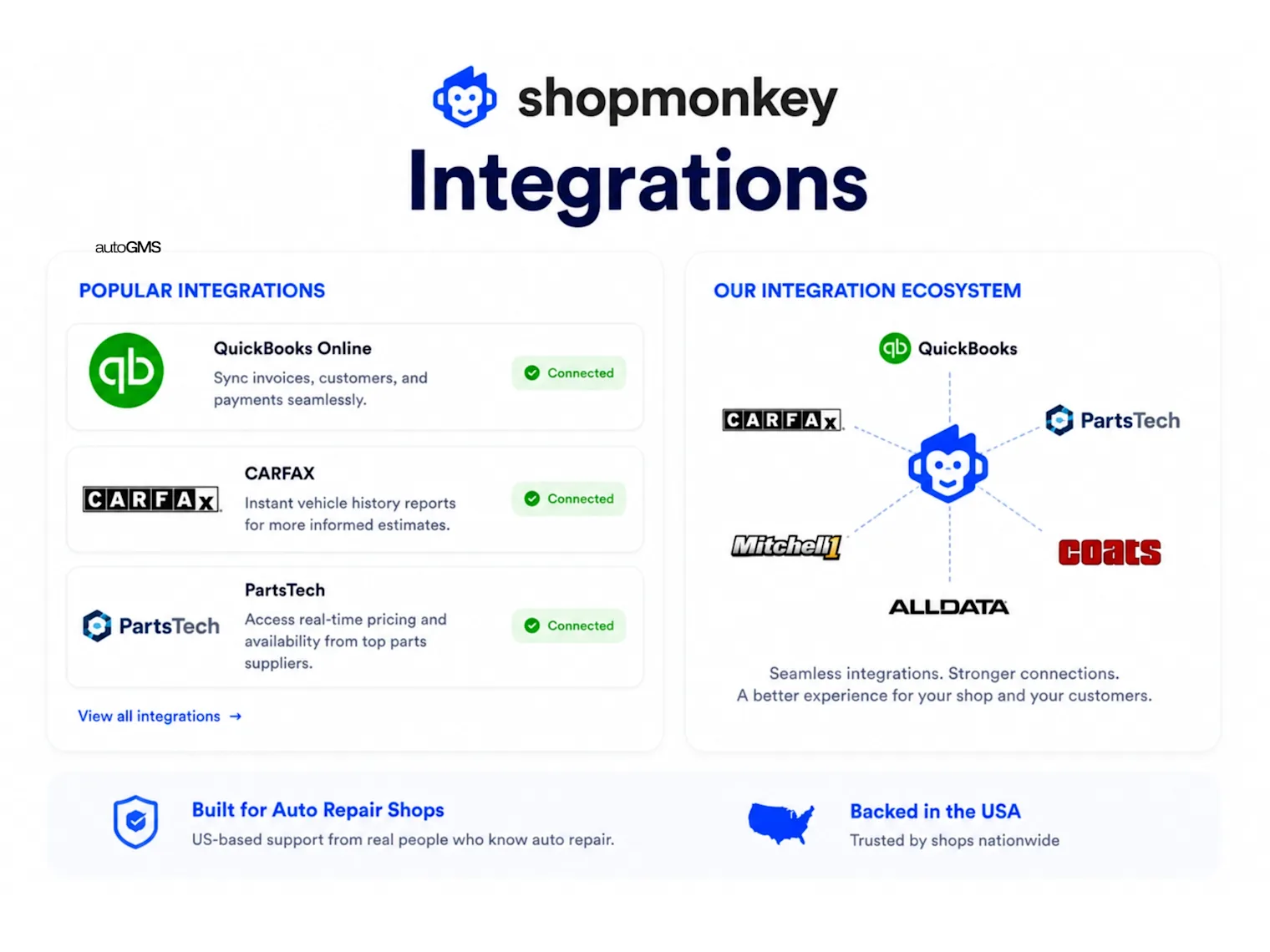
| Integrations | Supports accounting, API access, messaging, and regional integrations based on the market | Strong US-focused integration ecosystem, including parts, accounting, vehicle data, and payment tools |
| Regional fit | Designed for garages across the UAE, GCC, UK, US, Canada, and Australia, with region-specific workflows | Primarily designed for North American repair shops |
| Pricing model | Check the current autoGMS plan and confirm included users, locations, integrations, and support | Tiered Basic, Clever, Genius, and Multi-Shop plans, with user limits and paid add-ons |
Both platforms cover the main repair-shop workflow, but the packaging differs. autoGMS focuses on connecting bookings, job cards, bays, technicians, inventory, finance, and reporting in one system. Shopmonkey offers a mature North American platform with tiered plans, broad integrations, and advanced features that may require higher plans or paid add-ons.
Download the Auto Repair Software Buyer Checklist
Compare autoGMS and Shopmonkey across pricing, bookings, estimates, workshop workflow, technician management, inventory, CRM, reporting, integrations, onboarding, support, and total cost before choosing a platform.
Open the auto repair software buyer checklist
Your PDF is open in a new tab. Didn’t open? Open it here. Other downloads now take one click.
Which Platform Fits Different Repair Shops?
Small Independent Garage
autoGMS may suit smaller garages that want bookings, job cards, customers, estimates, invoicing, inventory, and reporting in one connected system without building the workflow from several add-ons. Shopmonkey can also work well, but the final cost depends on the selected plan, users, and additional services.
Busy Multi-Bay Workshop
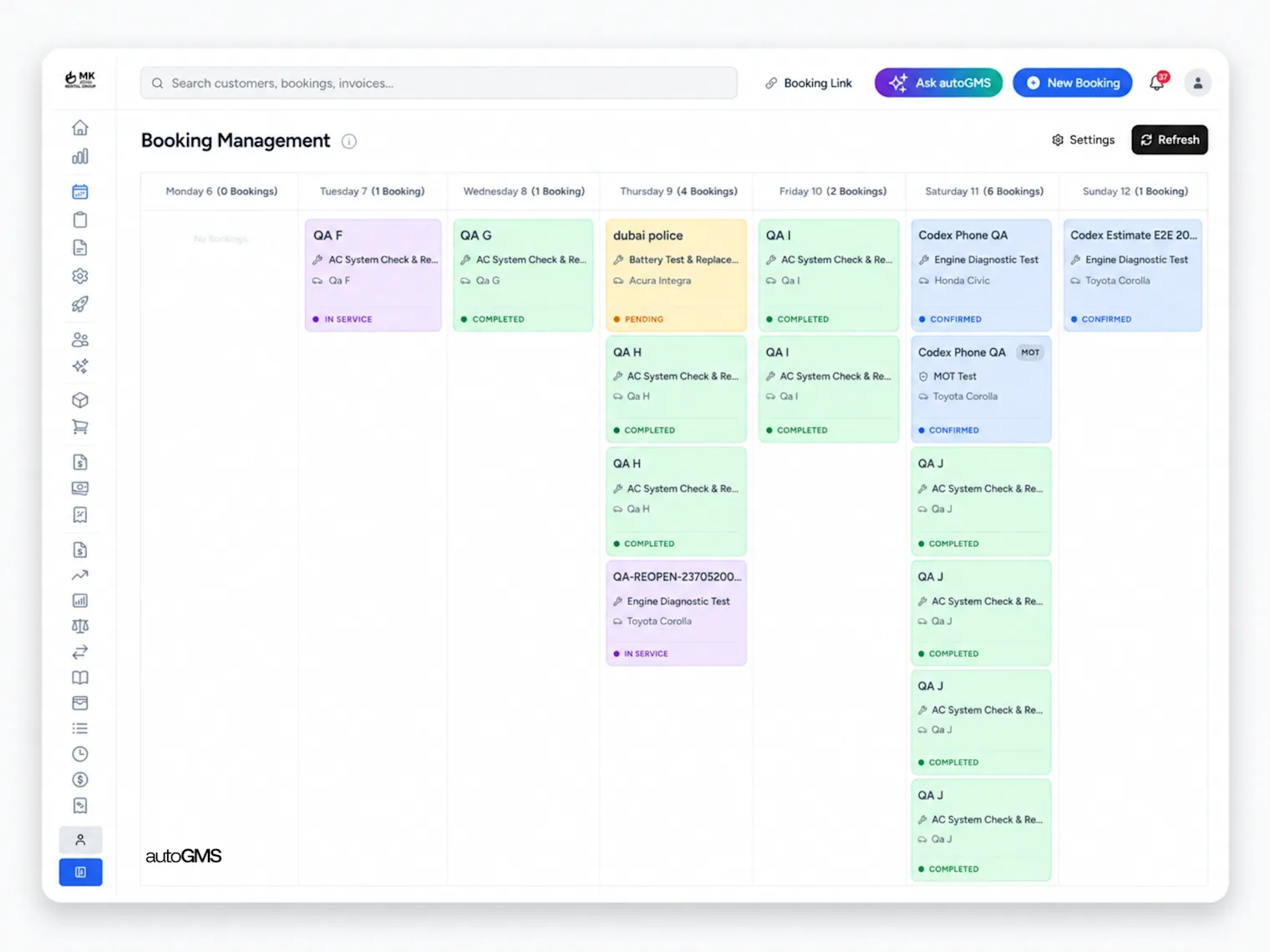
Both platforms can support active repair workflows, but compare how each handles technician assignments, job statuses, inspections, approvals, parts allocation, and workshop visibility. The best choice is the one that matches how your service advisors and technicians already work.
Multi-Location Repair Business
Multi-location businesses should compare centralized reporting, branch permissions, customer history, inventory visibility, user access, and location-based pricing. Shopmonkey offers a dedicated Multi-Shop option, while autoGMS can be configured for multi-garage oversight based on business requirements.
US Repair Shop
Both autoGMS and Shopmonkey are available to US repair shops. Shopmonkey offers a broad North American integration ecosystem, while autoGMS supports US garages with booking, job cards, technician management, inventory, CRM, invoicing, reporting, and SMS-based customer communication. The better fit depends on your required integrations, workflow, team size, and total cost.
UAE or GCC Garage
autoGMS is designed for garages operating across the UAE and GCC, with regional workflows, tax and invoicing requirements, communication options, and multi-garage management. It may be a better fit for shops that need local operational support rather than a US-first setup.
Shopmonkey vs autoGMS: Which is Better
The better choice depends on how your garage moves from booking to invoice. If you want fewer moving parts, autoGMS is the stronger fit. If you need deeper US integrations, Shopmonkey may suit your shop better.
For scheduling-specific decisions, review auto repair scheduling software guide after this section.
| Workflow step | autoGMS fit | Shopmonkey fit |
|---|---|---|
| Customer booking | Built around online booking and booking management. | Supports appointments, reminders, and customer communication. |
| Job setup | Uses job cards, bay management, and technician workload tools. | Uses workflow, estimates, inspections, and team tools. |
| Technician updates | Focuses on job visibility, bays, and technician scheduling. | Supports technician work through workflow and mobile app tools. |
| Customer communication | Includes CRM, customer history, reminders, and communication workflows. | Strong two-way texting, email, authorizations, and CRM options. |
| Estimate to invoice | Includes invoicing and expenses in Core. | Strong estimates, invoices, payments, and payment processing. |
| Reporting | Includes analytics for jobs, revenue, and performance. | Offers reporting, shop insights, and multi-shop reporting options. |
autoGMS works best when you want one simpler system for bookings, bays, job cards, CRM, inventory, invoicing, and analytics. It is built around independent workshops that need clearer daily control without stacking multiple tools together.
Shopmonkey works best when your shop needs a broader US-focused platform. It offers workflow, customer messaging, estimates, invoices, payments, inspections, reporting, integrations, and multi-shop support. Its pricing page also lists integrations like QuickBooks, CARFAX, PartsTech, RepairLink, and Nexpart.
So, the clear recommendation is this: choose autoGMS if your garage wants simpler operations and clearer pricing. Choose Shopmonkey if your garage needs deeper US integrations, more plan options, and a larger established platform.
Key Takeaways
autoGMS is better for garages that want simpler pricing and clearer daily operations: Its Core plan is listed at $219/month with no add-ons and no per-user fees. It also includes booking, job and bay management, digital job cards, inventory, CRM, invoicing, and expenses.
Shopmonkey is better for shops that need a mature US platform with broad integrations: It covers workflow, customer messaging, estimates, invoices, payments, inspections, reporting, integrations, and multi-shop support. It also highlights support, migration help, and North American shop use.
Shopmonkey starts lower, but total cost depends on users, add-ons, and plan needs: Its annual plans are listed at $179, $292, and $427/month. But extra users, CRM Essentials, support options, and add-ons can change the real monthly cost.
The best choice depends on workflow, team size, and required features: Choose autoGMS if you want fewer moving parts and clearer day-to-day control. Choose Shopmonkey if you need deeper US integrations, broader feature tiers, and a larger established platform.
Conclusion
Both autoGMS and Shopmonkey can support the core workflow of an auto repair shop, including bookings, estimates, job management, customer communication, inventory, invoicing, and reporting. The better choice depends on your location, team size, required integrations, pricing structure, and how closely each platform matches your existing workflow.
Shopmonkey may suit repair shops that want a North American-focused platform with tiered plans and a broad integration ecosystem. autoGMS may suit garages looking for a connected workshop system with support for the US, UAE, GCC, UK, Canada, and Australia.
Before deciding, compare the total cost, included users, add-ons, onboarding, migration, support, and the features your team will use every day. Book an autoGMS demo to see how the system fits your garage.
Frequently asked questions
What is the main difference between autoGMS and Shopmonkey?
Both platforms cover core repair-shop operations, but their positioning differs. autoGMS focuses on connected garage workflows across bookings, job cards, technicians, inventory, CRM, invoicing, and reporting, with support for multiple regions. Shopmonkey is strongly focused on North American repair shops and offers tiered plans with a broad US integration ecosystem.
How does autoGMS vs Shopmonkey pricing compare?
Shopmonkey publishes tiered plans, with costs affected by the selected package, included users, add-ons, payments, CRM, accounting, and multi-shop needs. autoGMS pricing should be confirmed through its current pricing page or a tailored quote. Compare the total cost, not only the starting monthly price.
Which platform is better for small repair shops?
autoGMS is a strong option for small garages that want clearer pricing, simpler workflows, and fast staff adoption. It covers booking, bay management, job cards, CRM, inventory, invoicing, and expenses in one system. Shopmonkey may still fit shops that need deeper US integrations or a broader established platform.
Is Shopmonkey suitable outside the US?
Shopmonkey is primarily designed for North American repair businesses. Shops outside the US should confirm whether its messaging, payments, accounting, vehicle data, tax settings, integrations, and support fit their market. autoGMS is available across multiple regions, including the US, UAE, GCC, UK, Canada, and Australia.
Which platform is better for multi-location garages?
Multi-location businesses should compare centralized reporting, user permissions, shared customer history, inventory visibility, location controls, integrations, and total pricing. Shopmonkey offers a dedicated Multi-Shop option, while autoGMS can support multi-garage workflows based on the business setup and regional requirements.