
Auto repair shop management software. One record from booking to paid.
autoGMS runs the whole job for an independent shop: the booking, the inspection, the estimate, the bay, the invoice and the financial report. Each step picks up what the last one entered.
Lopez Auto Repair
Austin, TX · Open today 7 am to 6 pm
Step 3 of 4
Pick a time
October 2026
You'll get a confirmation by email and text.
2019 Honda Accord
Your front brakes need work soon
62 fine 1 fix soon 1 to watch
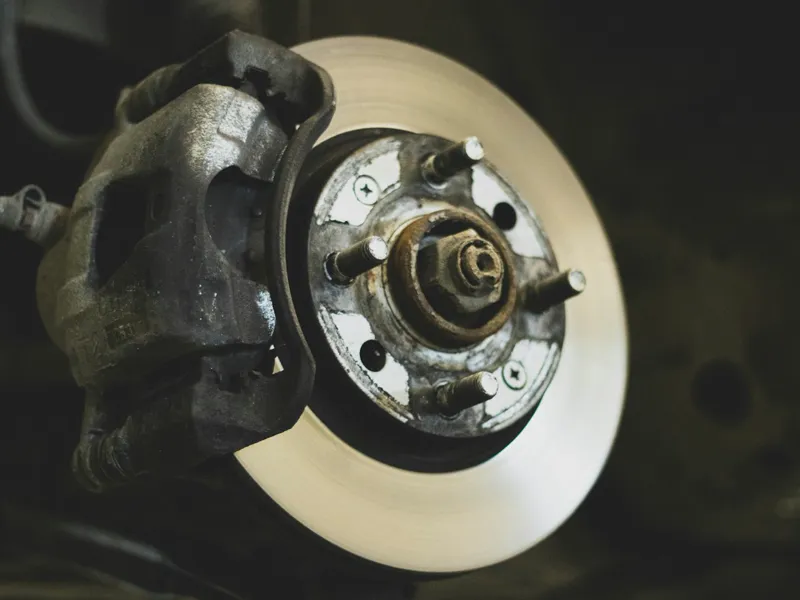 4 photos
Fix soon
Front brake pads at 2 mmNew pads are 10 mm. Below 3 mm they can score the rotors.
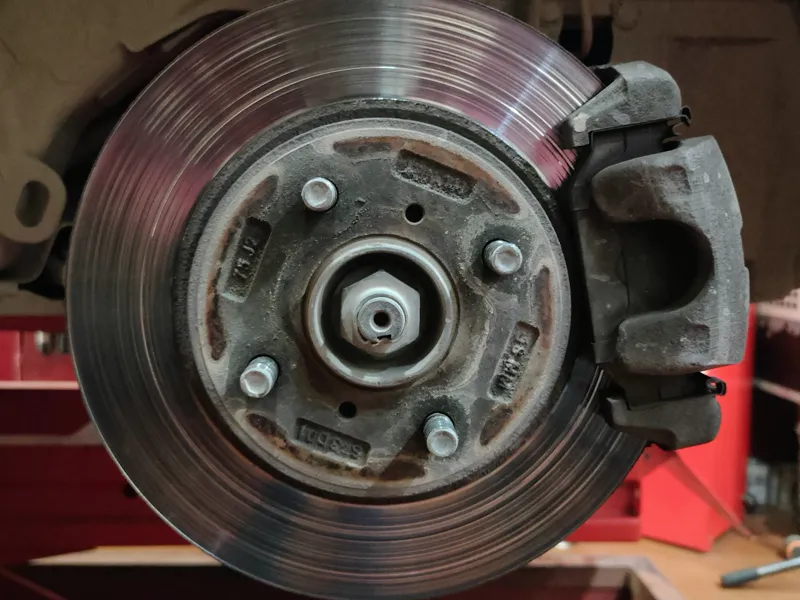 3 photos
Keep an eye on
Front rotors worn, lip on the edgeBest replaced together with the pads.
Lopez Auto Repair
Estimate EST-2026-0318 · 2019 Honda Accord
John, approve or decline each repair.
Approved repairs$496.95
Sales tax 8.25% on parts$20.95
Total approved$517.90
Approved by John Miller · Tue, Oct 6, 9:12 am
Workshop
3 working · 1 ready · 3 waiting2021 Ford F-150
NRT-2290Oil change + tire rotation
M Mike T.
2018 Toyota Camry
KDV-7713Check engine light
D Dana W.
2019 Honda Accord
LKP-4821Front pads and rotors
C Carlos R.
2016 Jeep Wrangler
HFS-0418A/C diagnosis
M Mike T.
Waiting for a bay
Lopez Auto Repair
2210 S Lamar Blvd, Austin, TX 78704
(512) 555-0142
Invoice
INV-2026-0142
Oct 6, 2026
Paid in full
Bill to
John Miller
(512) 555-0199
Vehicle
2019 Honda Accord
LKP-4821 · 48,210 mi
DescriptionQtyAmount
Front brake pads, ceramic 1 $89.95
Front rotors 2 $164.00
Brake labor 1.8 h $243.00
Subtotal$496.95
Sales tax 8.25% on parts$20.95
Total$517.90
Paid by card · Oct 6−$517.90
Balance due$0.00
What you type once. And where it shows up again.
This is the reason to run one system instead of five. Here is what moves along with the job, step by step.
-
Booking → customer record
NamePhoneVehicleThe profile builds itself from the booking. Returning customers come up as you type, so there are no duplicates.
-
Booking → estimate
CustomerVehicleServicesPricesAssigned partsOpen the estimate from the booking and the work is already loaded.
-
Approved estimate → a job on a bay
CustomerVehicleEstimate detailsTurn an approved estimate into a booking with no re-entry. Put it on a bay and the clock starts.
-
Part assigned to the job → stock count
QuantityWhich job used itStock goes down the moment a part is assigned.
-
Finished job → invoice
ServicesPartsCustomerThe invoice opens with the job’s services and parts on it. Review it and send.
-
Paid invoice → the month’s numbers
IncomeBooking statusJob valueThe dashboard counts it. Nobody keys it into a spreadsheet.
Everyone in the shop logs in. Each person sees their part.
Owner
- Sees
- Everything, including financial reports, billing and settings.
Manager
- Runs
- The day’s operations, the team and the reports.
Service advisor
- Handles
- Bookings, customers, invoices and the front desk.
- Doesn’t open
- Financial reports or analytics.
Technician
- Sees
- Their own jobs and bays, and the inspections they do.
- Doesn’t open
- Bookings, customers, estimates or financial pages.
You can change what each role opens, shop by shop.
Runs in a browser. Nothing to install.
The front desk
A desktop browser at the counter.
The bay
Techs use their phone’s browser, camera included. There’s no separate app to install.
The shop wall
A TV display mode shows every bay to the whole shop.
The customer’s phone
Inspection reports and estimates open from a link. No app, no login.
More than one shop? One login switches between them. Your team’s language? The app runs in English, Arabic and French.
Two plans. Two add-ons, if you need them.
Core
Fixed pricing for your region. Add either add-on when you need it.
Scale
Custom pricing. Talk to us about your setup.
Add-ons on Core
Prices and exactly what each plan includes are on the pricing page.
See pricingConnects to your accounting and payments. Everything else through the API.
- Two-way accounting sync, with the Financial Reports add-on
- Two-way accounting sync, with the Financial Reports add-on
- Two-way accounting sync, with the Financial Reports add-on
- Qoyod Accounting sync, with draft invoices sent to Qoyod
- Card payment links on invoices, through your own Stripe account
- Connect via API Any other tool, through the public API. API Access is an add-on on Core.
Coming from another system? Bring your customers and parts.
- Import customers from a spreadsheet, 500 at a time.
- Import your parts list from a spreadsheet.
- A setup checklist gets your service menu and booking page live.
Where it stops. Better to know now.
- It doesn’t diagnose. Your techs decide what’s wrong. autoGMS records it and shows it to the customer.
Every tool has its own page. Start with the one that hurts most.
Get the car in
Run the floor
Keep the customer
Be live in 5 minutes. Free. No card, no call.
Add your shop, your services and your labor rate, and your online booking page goes live. It stays free. The full shop system is free for 14 days.