autoGMS logo
autoGMS logo
Pricing
About
Sign in
Book demo
autoGMS

Garage management software made for auto repair shops. Manage jobs, bays, technicians, bookings, and customers in one platform.

hi@myautogms.com

Dubai, UAE · London, UK

Features

Garage Software OverviewOnline BookingCRM & MarketingAccounting & FinanceBusiness AnalyticsBooking ManagementCustomer RecordsParts InventoryJob Cards & BaysTechnician WorkloadVAT Compliance

Guides & Tools

  • Profit Calculator
  • Management Guide
  • Booking & Scheduling Guide
  • Automotive Glossary
  • Health Check
  • Invoice Generator
  • US Vehicle Lookup
  • Product Demo
  • AutoGMS vs Tekmetric

Shop Types

General Repair ShopsIndependent ShopsMobile Repair ShopsSpecialty Shops

Locations

DubaiAbu DhabiUAESaudi ArabiaKuwaitQatarBahrainOman

Company

AboutPricingBlogSecurityLogin

© 2026 autoGMS. All rights reserved.

PrivacyTerms
TwitterLinkedInMediumYouTube
Parts, suppliers, stock, and margins

Garage Inventory Management Software

Built for auto repair shops that need live stock counts, supplier and PO tracking, job costing, invoices, and margin visibility in one workflow.

Live stock counts|Supplier and PO tracking|Job costing and margins

From Stock Check to Job Card to Invoice

autoGMS connects inventory to the real workshop flow: check availability, reserve or use the part, carry the cost into the invoice, and see the margin in reports.
See Parts Inventory in autoGMS

Availability before approval

Check whether the part is on hand before the advisor confirms work or promises a turnaround time.

Usage tied to the job

When a part is used, it stays connected to the job card, vehicle history, and stock movement.

Margin visible after billing

Parts costs flow into invoices and reports so managers can see what the job actually earned.

Inventory Problems Show Up as Delays and Lost Margin

When stock counts, supplier notes, and part costs live outside the job workflow, the damage shows up later: delayed cars, rushed orders, wrong margins, and cash sitting in the wrong parts.
See parts inventory in autoGMS

A technician reaches for a part that the system says exists, but the shelf is empty.

Product workflow proof

From Part to Job to Invoice

autoGMS is not just a stock list. Inventory sits inside the same workflow your advisors, technicians, and managers already use to move work through the garage.

Step 1

Check stock first

Service advisors can see whether the right part is available before promising a repair time.

Step 2

Add parts to jobs

Technicians use parts against the work order, so stock movement stays connected to the vehicle.

Step 3

Carry cost to invoices

Parts, cost, markup, and customer price stay tied together instead of being rebuilt later.

Step 4

Report stock margin

Owners can see which parts move, which ones tie up cash, and what each job actually earned.

Manage Every Part From Shelf to Invoice

Set stock rules, manage supplier purchasing, track cost and margin, then connect every part back to the job card.

01/Stock Control

Set reorder levels

  • Min and max levels per partSet a reorder floor and a ceiling for every item, so you never run dry on a fast mover or over-buy a slow one.
  • Alerts before jobs stallThe moment a part dips below its threshold, you're warned — not when a technician reaches for an empty shelf.
  • Live counts across locationsReal quantities update as parts move, across shelves, bays, and storage areas, so what you see is what you have.
  • Overstock guardrailsCeilings flag parts piling up faster than they sell, before working capital gets trapped in dead stock.
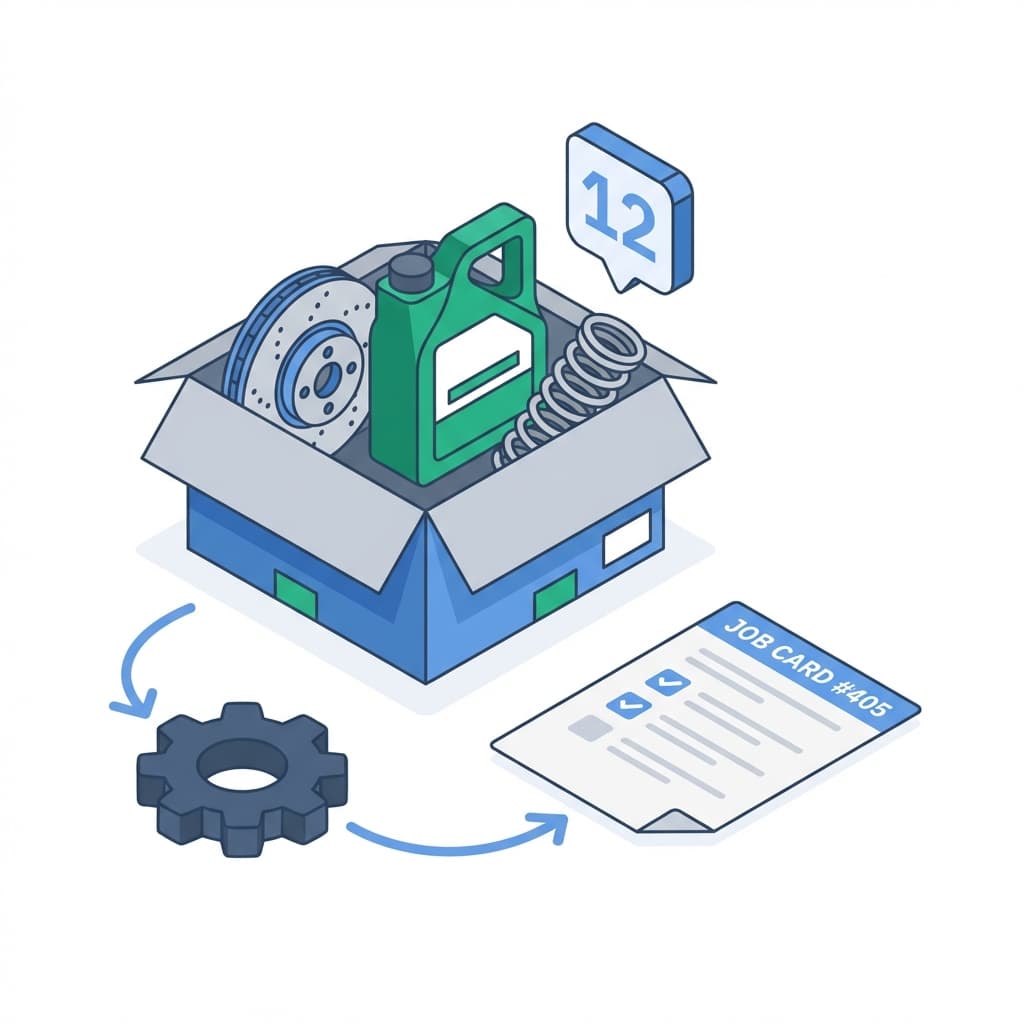
Garage inventory management software showing real-time stock levels, automated reorder alerts, and multi-location parts tracking
02/Supplier Mgmt

Manage suppliers and POs

  • One record per supplierContacts, lead times, and price history live together instead of scattered across inboxes and spreadsheets.
  • Purchase orders from low stockTurn a low-stock alert straight into a PO with quantities pre-filled — no re-keying part numbers.
  • Performance you can compareRank suppliers on price, delivery speed, and reliability before you commit the next order.
  • Backup sources on fileKeep a second and third source for critical parts, so one supplier's delay never stops a job.
Auto parts supplier management dashboard with pricing comparison, performance tracking, and lead time monitoring
03/Cost Analysis

Track part margins

  • Value and turnover at a glanceTrack what your stock is worth and how fast it cycles, so capital keeps moving instead of sitting on a shelf.
  • Margin by partSee markup and profit on every part to lean into the money-makers and reprice the ones quietly losing you money.
  • Dead-stock detectionSurface slow movers while there's still time to discount, return, or stop reordering them.
  • Tied into business analyticsFeed parts data into your wider reporting to connect inventory to revenue and overall profit.
Parts profitability analysis dashboard showing inventory valuation, turnover rates, and cost tracking for auto repair shops
04/Integration

Connect parts to job cards

  • Tied to the booking systemParts link straight into the booking and job workflow, so stock and schedule stay in sync.
  • Automatic deductionStock drops the moment a technician logs a part to a job — no manual counts, no end-of-week reconciliation.
  • Per-vehicle historyEvery part fitted is recorded against the customer's vehicle, ready for warranty claims and future work.
  • Visible inside job cardsTechnicians see exactly which parts a job needs and what's already been used, right on the card.
Inventory integration with booking system and job cards showing automatic parts tracking and job costing

Ready to optimize your parts inventory?

Track parts, avoid stockouts, and keep margins visible.

Loading live demo scheduler...

Inventory, Parts, Suppliers, and Margins

Common questions about parts, suppliers, job cards, and margins.

autoGMS lets you set reorder levels for fast-moving parts, track live stock counts, and warn the team before a job is delayed by an empty shelf.

Explore related features

View all features

Accounting & Finance

Track reports, VAT, expenses, deposits, and credit notes in one workflow.

Learn more

Booking & Scheduling

24/7 online booking system that lets customers book appointments instantly.

Learn more

Job Cards & Bays

Visual workshop control with drag-and-drop job cards.

Learn more
View all features