The Dashboard Every Profitable Auto Repair Shop Relies On
Get a clear overview of your garage with a management dashboard that tracks jobs, revenue, performance, and inventory in one place.
On this page
Running an auto repair shop means keeping track of far more than just vehicles in the workshop. Bookings, jobs, invoices, expenses, inventory levels, and customer activity all change daily, and missing one detail can lead to delays, lost revenue, or poor customer experience.
A garage management dashboard brings all of this information together in one place. Instead of switching between tools or relying on spreadsheets, shop owners get a real-time overview of how the business is performing, what needs attention, and where action is required.
In this guide, we’ll break down what a garage management dashboard is, how it works in practice, and how auto repair shops use it to stay organized, make faster decisions, and run smoother day-to-day operations.
What Is a Garage Management Dashboard?
A garage management dashboard is a centralized view that shows the most important operational and financial information of an auto repair shop in real time. It acts as the control center of the business, allowing shop owners and managers to understand what is happening across bookings, jobs, revenue, and inventory without digging through separate screens or reports.
Unlike spreadsheets or disconnected tools, a dashboard presents key data visually and updates automatically as activity happens in the workshop. When a booking is confirmed, a job is completed, an invoice is created, or stock runs low, the dashboard reflects these changes immediately. This helps garages react faster and stay in control throughout the day.
For an auto repair shop dashboard, the goal is clarity rather than complexity. Instead of overwhelming users with raw data, the dashboard highlights what matters most at a glance, such as how many vehicles are currently in service, how many bookings are waiting, whether unpaid invoices are building up, and how the business is performing financially.
A well-designed workshop management dashboard also connects day-to-day operations with business performance. By combining operational signals and financial summaries in one view, garage owners can quickly identify issues, spot trends, and make informed decisions without needing accounting or technical expertise.
Key Sections Inside the autoGMS Dashboard
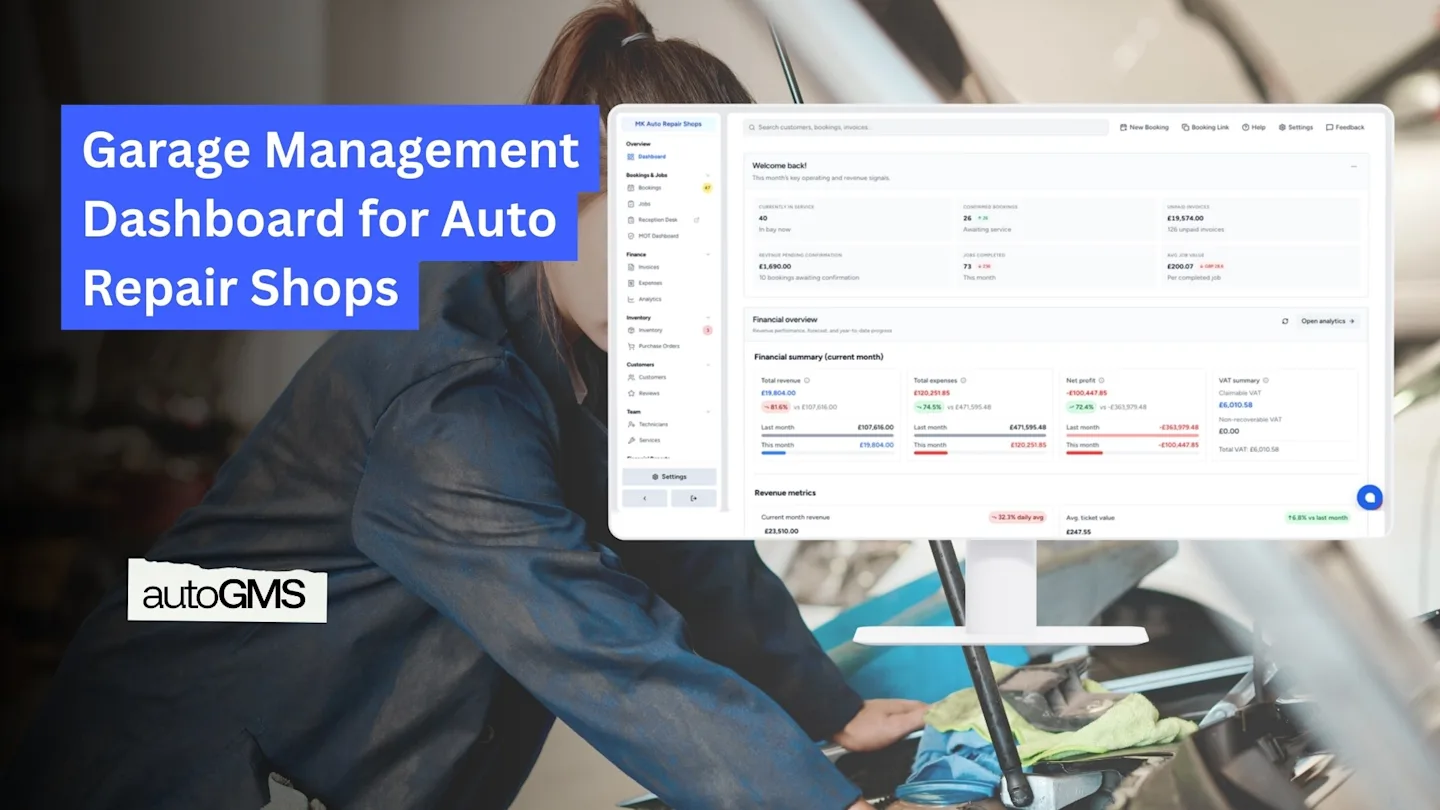
The autoGMS dashboard is designed to give garage owners a clear picture of their business without information overload. Instead of listing raw data, it groups insights into practical sections that reflect how an auto repair shop actually operates day to day.
Below are the key areas garage owners rely on most.
Operational Overview: Bookings and Jobs
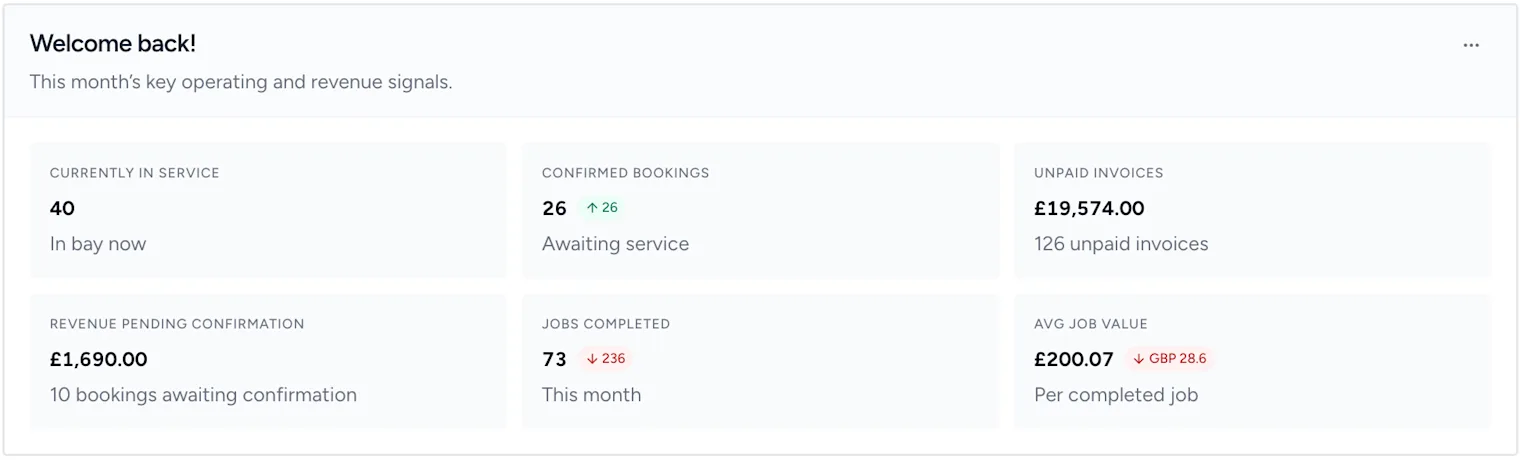
At the top of the dashboard, shop owners can immediately see what is happening in the workshop right now. This includes vehicles currently in service, confirmed bookings awaiting work, and jobs completed within the selected period.
These signals help managers quickly assess workload and capacity. If the number of active jobs is high or bookings are stacking up, decisions can be made early to adjust schedules, assign technicians, or communicate with customers before delays occur.
Financial Overview at a Glance
The financial section provides a clear snapshot of how the business is performing financially, without needing to open detailed reports. Garage owners can view total revenue, total expenses, net profit, and VAT summaries for the current period, along with comparisons to previous months.
This makes it easier to spot warning signs early, such as rising expenses or declining profit, and ensures financial performance is monitored regularly rather than only at month-end.

Revenue and Performance Trends
Beyond totals, the dashboard also highlights trends over time. Revenue charts and average job value metrics show whether the business is growing, stabilizing, or slowing down.
For a garage performance dashboard, these trends are often more valuable than individual numbers. They help shop owners understand patterns, evaluate pricing strategies, and track the impact of operational changes across weeks or months.

Daily Activity and Operational Snapshot
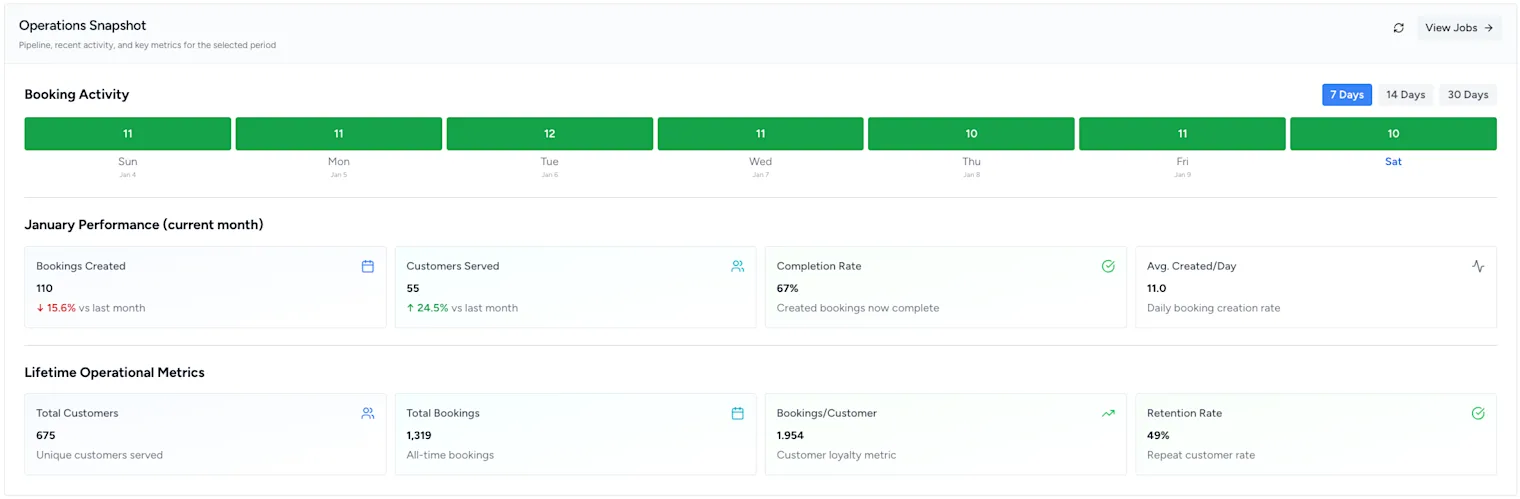
This section focuses on daily performance indicators such as booking activity, customers served, completion rates, and booking creation trends. It helps managers understand how efficiently the shop is operating on a day-to-day basis.
By reviewing this snapshot regularly, garage owners can identify workflow bottlenecks, assess technician productivity, and make small adjustments that improve overall efficiency.
Inventory Alerts and Stock Health
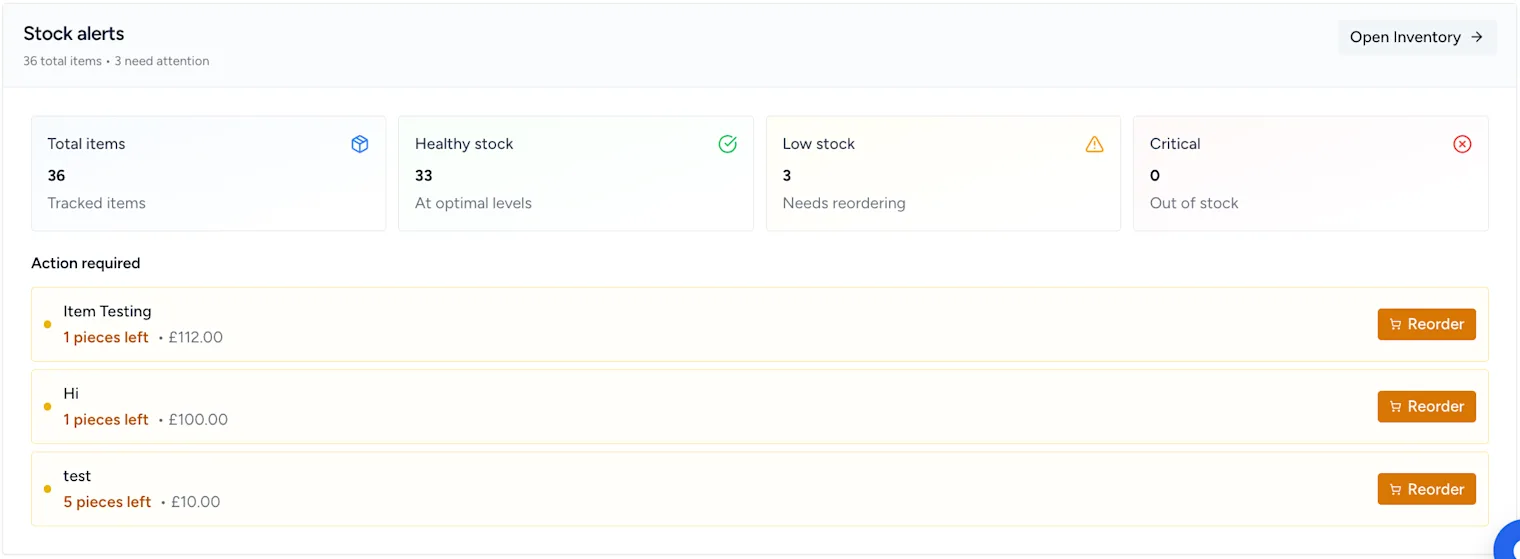
The dashboard also surfaces critical inventory information, including low-stock alerts and items that need reordering. This prevents unexpected part shortages that can delay repairs and frustrate customers.
Having stock alerts visible on the main dashboard ensures inventory issues are addressed proactively, rather than discovered when a job is already in progress.
How Garage Owners Use the Dashboard Day to Day
Garage owners use the dashboard as a practical reference point throughout the day rather than a reporting tool they check occasionally.
In the morning, the dashboard helps managers review confirmed bookings, jobs in progress, and overall workload so the team starts the day prepared. This quick check makes it easier to allocate resources and avoid scheduling issues before work begins.
During the day, the dashboard updates automatically as jobs are completed, bookings change, and inventory levels shift. Managers can quickly spot delays, identify bottlenecks, or respond to low-stock alerts without leaving the main screen.
At the end of the day or week, the dashboard supports review and planning. Financial summaries and performance trends provide a clear picture of how the workshop performed, helping owners prepare for the next period with accurate information rather than assumptions.
How a Centralized Dashboard Supports Better Decisions
A centralized garage management dashboard improves decision-making by removing guesswork. When operational activity, financial performance, and inventory signals are visible in one place, issues become easier to identify and address early.
Instead of relying on disconnected tools or delayed reports, garage owners can see how daily activity impacts revenue, costs, and workflow in real time. This visibility helps prioritize actions that have the greatest effect on efficiency and profitability, such as adjusting schedules, reviewing pricing, or restocking critical parts.
Over time, consistent use of a garage performance dashboard helps shop owners recognize patterns and trends more clearly. Decisions become faster, more confident, and based on accurate data that reflects the actual state of the business.
Conclusion and Next Steps
A garage management dashboard brings clarity to the daily complexity of running an auto repair shop. By combining operational data, financial summaries, and inventory insights into a single view, it helps garage owners stay organized and informed without unnecessary complexity.
With a clear, real-time overview, shop owners can respond faster, plan more effectively, and make decisions with confidence.
See how the autoGMS dashboard works in a real garage setup and explore how it supports day-to-day operations.
Frequently asked questions
What is a garage management dashboard?
A garage management dashboard is a centralized screen that shows key operational and financial metrics for an auto repair shop in real time. It helps shop owners monitor bookings, jobs, revenue, expenses, and inventory from one place without switching between tools.
What should an auto repair shop dashboard include?
An effective auto repair shop dashboard should include job and booking status, financial summaries such as revenue and expenses, performance trends, and inventory alerts. These metrics give garage owners quick visibility into daily operations and overall business health.
How does a dashboard help garage owners make better decisions?
A dashboard helps garage owners make better decisions by providing real-time insights into operations and performance. By seeing key data in one place, owners can identify issues early, prioritize actions, and plan more confidently based on accurate information.