How to Use the Cash Flow Statement in AutoGMS
Learn how to use the Cash Flow Statement in AutoGMS to track cash in, cash out, operating activities, and equipment investments.
On this page
While the Profit & Loss report shows profitability and the Balance Sheet shows financial position, the Cash Flow Statement shows something equally important:
How cash actually moves in and out of your garage.
A business can be profitable on paper but still struggle with cash. The Cash Flow report in AutoGMS helps you monitor:
Cash received from customers
Cash paid to suppliers
Cash paid for operating expenses
Cash used for equipment or investments
This report gives you real visibility into your workshop’s liquidity and day-to-day financial health.
What the Cash Flow Statement Shows at a Glance
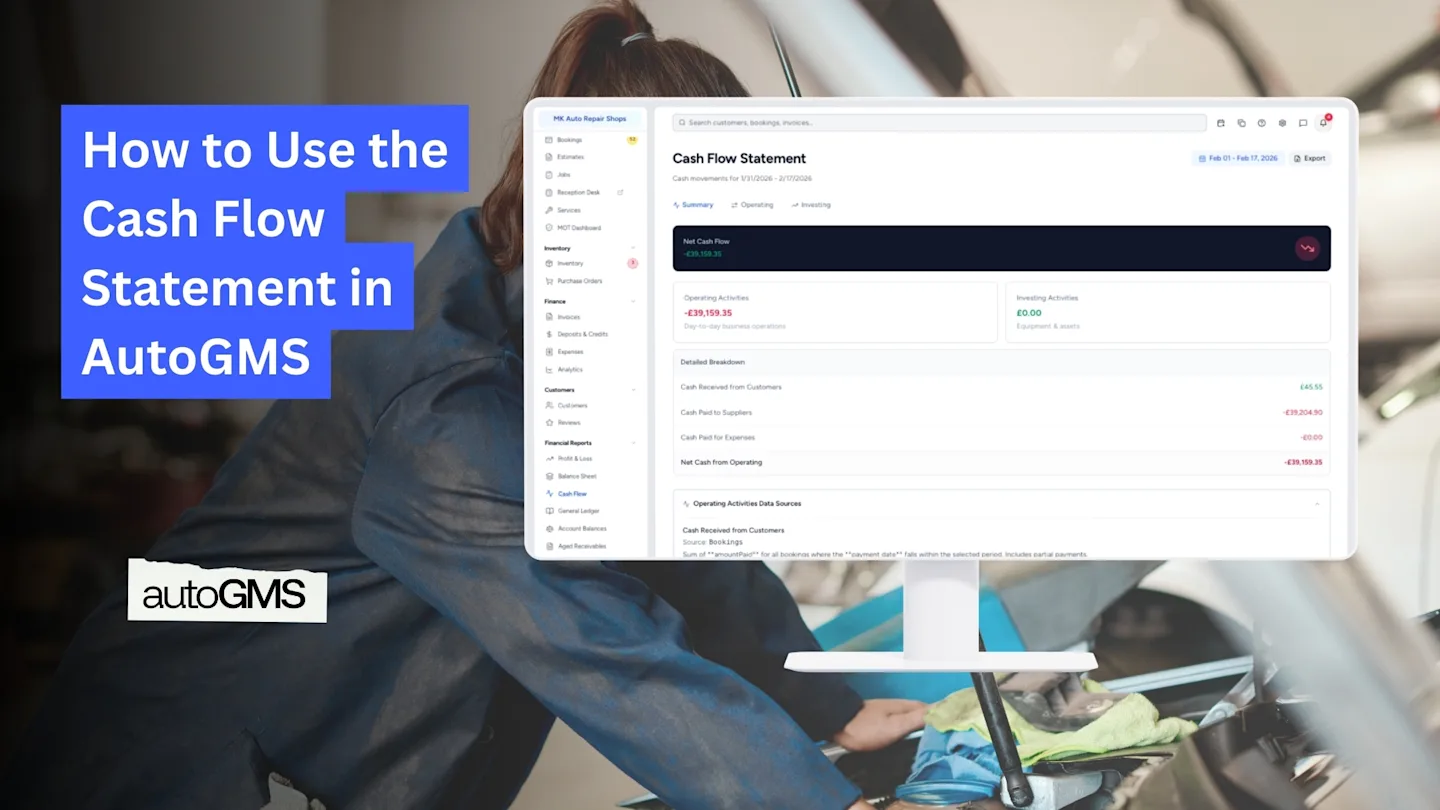
At the top of the report, you will see:
Net Cash Flow
This shows the total cash movement during the selected period.
If positive → More cash came in than went out. If negative → More cash went out than came in.
Below that, the report is divided into two main categories:
Operating Activities
Investing Activities
Understanding Operating Activities
Operating Activities show the cash movement from your daily garage operations.
This typically includes:
Cash Received from Customers
Total payments collected from bookings within the selected period. This includes partial payments.
Cash Paid to Suppliers
Payments made for parts categorized as Cost of Goods Sold (COGS).
Cash Paid for Expenses
Payments made for operational expenses such as rent, utilities, labor, and subscriptions. This excludes COGS and equipment purchases.
At the bottom, you will see:
Net Cash from Operating
This shows whether your daily operations are generating or consuming cash.

Understanding Investing Activities
Investing Activities focus on long-term purchases.
Purchase of Equipment
This includes expenses categorized as Equipment or Assets.
These are capital expenditures (CapEx) rather than daily operational costs.
If this number is negative, it means you invested in equipment during that period.

Why the Cash Flow Statement Matters
Cash flow determines whether you can:
Pay suppliers on time
Cover operating expenses
Invest in new equipment
Avoid cash shortages
Even if your Profit & Loss report shows profit, poor cash flow can create financial stress.
The Cash Flow report helps you monitor liquidity and make smarter financial decisions.
Frequently asked questions
Why is my cash flow negative if I made a profit?
Because Profit & Loss is based on completed jobs, while Cash Flow is based on actual payments received and made.
Do partial payments count?
Yes. Cash received includes partial payments within the selected period.
Why are equipment purchases not included in operating cash?
Because they are considered investing activities, not daily operational expenses.
Should I check cash flow monthly?
Yes. Monthly review is recommended to avoid liquidity issues.