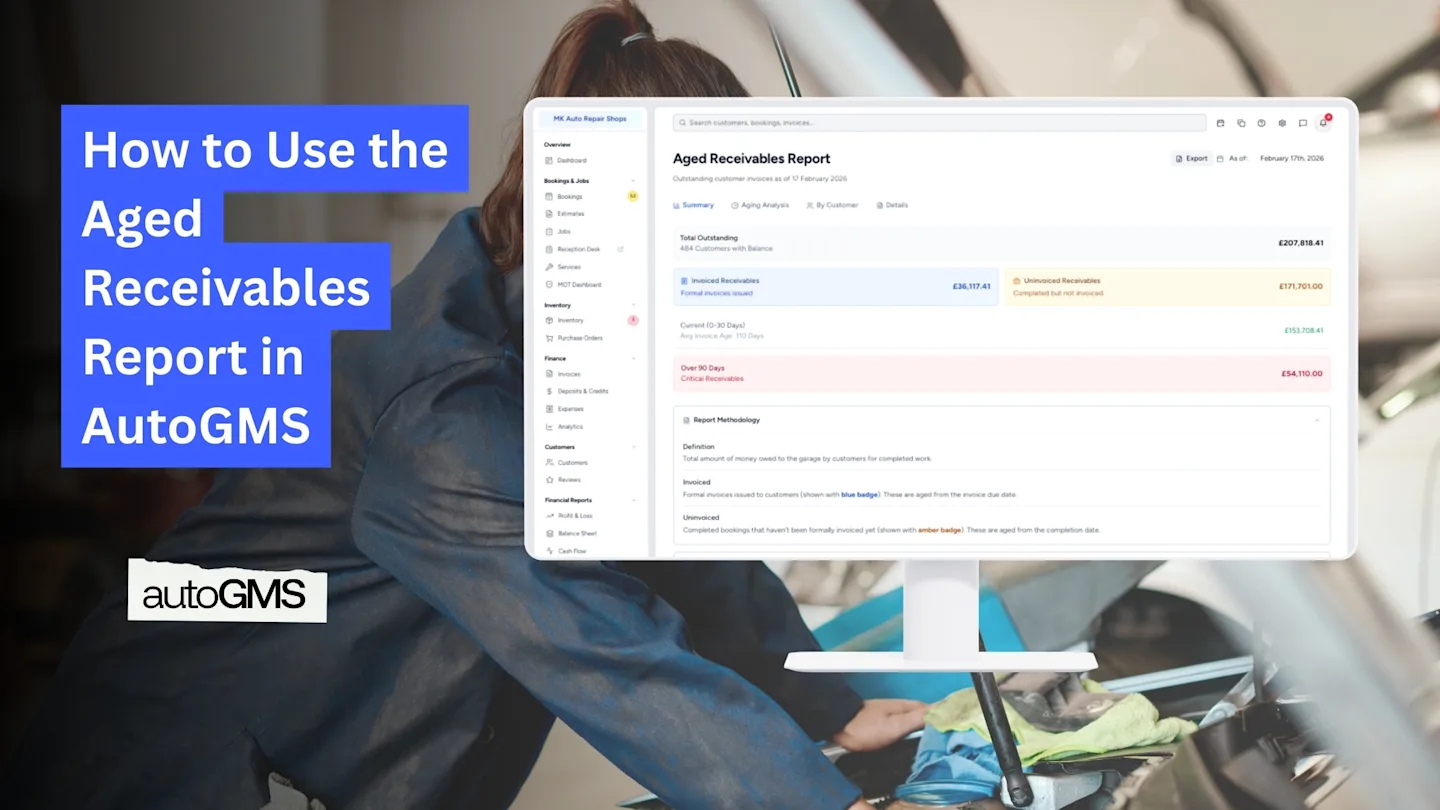
How to Use the Aged Receivables Report in AutoGMS
Learn how to use the Aged Receivables Report in AutoGMS to track unpaid invoices, overdue customers, and improve cash collection.
On this page
The Aged Receivables Report in AutoGMS shows all outstanding customer invoices and organizes them based on how long they have been unpaid.
While:
Profit & Loss shows profitability
Cash Flow shows money movement
The Aged Receivables report shows who still owes you money and for how long.
This report is essential for:
Monitoring unpaid invoices
Managing overdue customers
Protecting your cash flow
Reducing bad debt risk
In this guide, you will learn how to read each tab and use the report effectively.
What the Aged Receivables Report Shows at a Glance (Summary Tab)
At the top of the report, you will see:
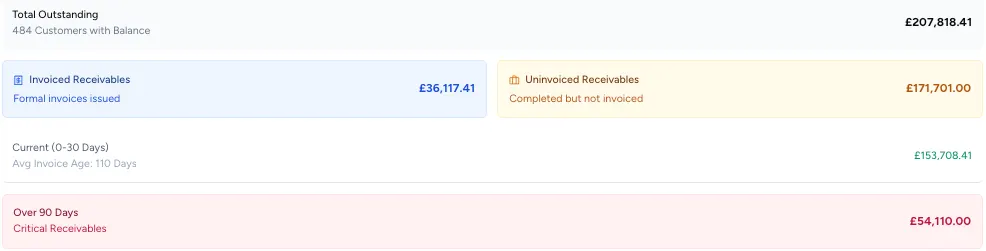
Total Outstanding
The total amount customers currently owe.
This includes:
Invoiced receivables (formal invoices issued)
Uninvoiced receivables (completed but not yet formally invoiced)
This distinction is important because uninvoiced work still impacts your cash flow.
You will also see:
Current (0–30 Days)
Over 90 Days (critical receivables)
Understanding the Aging Analysis Tab
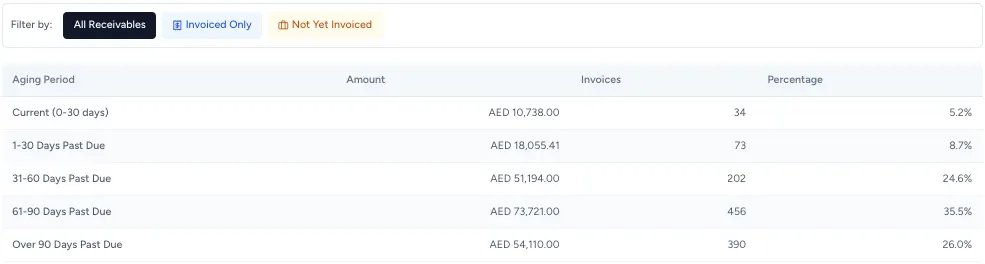
The Aging Analysis tab breaks receivables into time buckets:
Current (0–30 days)
1–30 Days Past Due
31–60 Days Past Due
61–90 Days Past Due
Over 90 Days Past Due
Each row shows:
Total amount
Number of invoices
Percentage of total receivables
This helps you quickly identify payment risk.
If a large percentage falls under 60+ or 90+ days, immediate follow-up is recommended.
Understanding the By Customer Tab
The By Customer tab shows outstanding balances grouped by customer.
You can see:
Total outstanding per customer
Breakdown by aging bucket
Oldest invoice age
This helps you identify:
High-risk customers
Long-standing unpaid invoices
Clients requiring follow-up
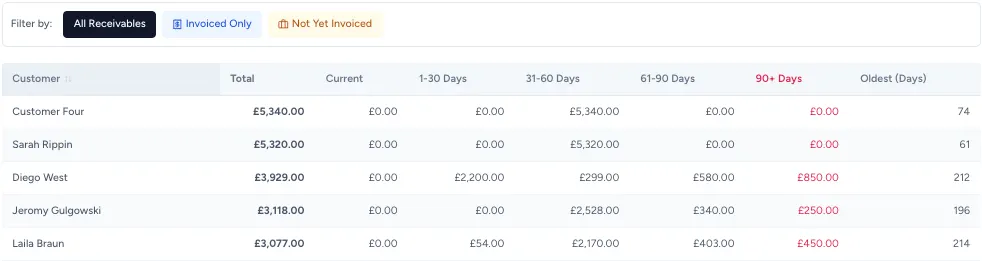
This tab is especially useful for prioritizing collections.
Understanding the Details Tab
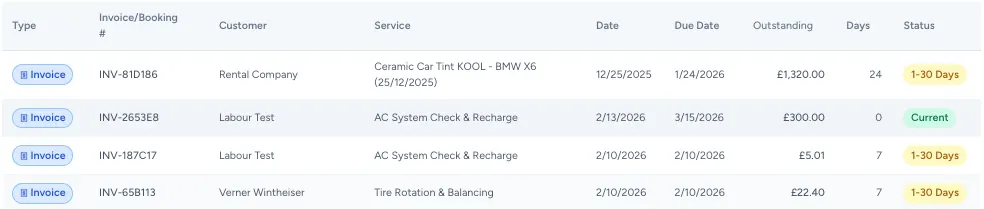
The Details tab provides invoice-level information.
Each row shows:
Invoice number
Customer
Service
Invoice date
Due date
Outstanding amount
Days overdue
Status (Current, 1–30 Days, etc.)
This is the most detailed view and is used for:
Direct customer follow-up
Dispute resolution
Collection tracking
Important Notes
Aging is calculated based on the Invoice Date.
The report includes both formal invoices and uninvoiced completed bookings.
It is intended for internal management, not official statutory reporting.
Regular review improves cash collection performance.
When Should You Review Aged Receivables?
Recommended frequency:
Weekly for active workshops
Before month-end closing
Before making large supplier payments
When cash flow is tight
Strong receivables management directly improves liquidity.
Conclusion
The Aged Receivables Report gives you visibility into unpaid customer balances and overdue invoices.
If you want to improve cash flow, reduce payment delays, and maintain financial control, this is one of the most important reports to review regularly.
Frequently asked questions
What is the difference between invoiced and uninvoiced receivables?
Invoiced receivables are formal invoices issued to customers. Uninvoiced receivables are completed jobs that have not yet been formally invoiced.
Why is aging important?
Aging helps you identify overdue invoices and potential bad debt risk.
Does this report include partial payments?
Yes. Outstanding balances reflect remaining unpaid amounts.
How can I reduce 90+ day receivables?
Review overdue invoices regularly, contact customers early, and issue invoices promptly.