How Digital Job Cards Keep Your Workshop Organized
Manage workshop jobs with digital job cards. Track bays, technicians, and job status in real time using modern booking management software.
On this page
- From Booking to Job Card: How Work Enters the Workshop
- The Job Cards Dashboard: Your Workshop at a Glance
- Understanding Job Statuses Without Guesswork
- Assigning Jobs to Service Bays
- What You See Inside a Job Card
- Assigning Technicians and Managing Workload
- Handling Delays Without Losing Control
- Parts, Services, and Pricing All in One Place
- Planning Ahead with Calendar and List Views
- Why Digital Job Cards Make Workshops Run Better
- FAQs
Every workshop runs on bookings. But bookings alone do not keep cars moving through bays, technicians busy, or invoices accurate.
What actually controls day-to-day operations is the job card.
In modern booking management software, job cards replace paperwork, whiteboards, and constant back-and-forth between the front desk and the workshop. They turn each booking into a clear, trackable job that everyone can see and understand.
This guide walks through how digital job cards work in practice, how they support workshop scheduling, and how mechanics and managers can use them to stay organized without adding complexity.
From Booking to Job Card: How Work Enters the Workshop
Once a booking is confirmed, it becomes a garage job card.
That job card connects:
The customer
The vehicle
The service booked
The assigned technician
The job’s progress and value
Nothing starts without a job card. This keeps work visible, measurable, and properly tracked from the moment the car arrives.
The Job Cards Dashboard: Your Workshop at a Glance
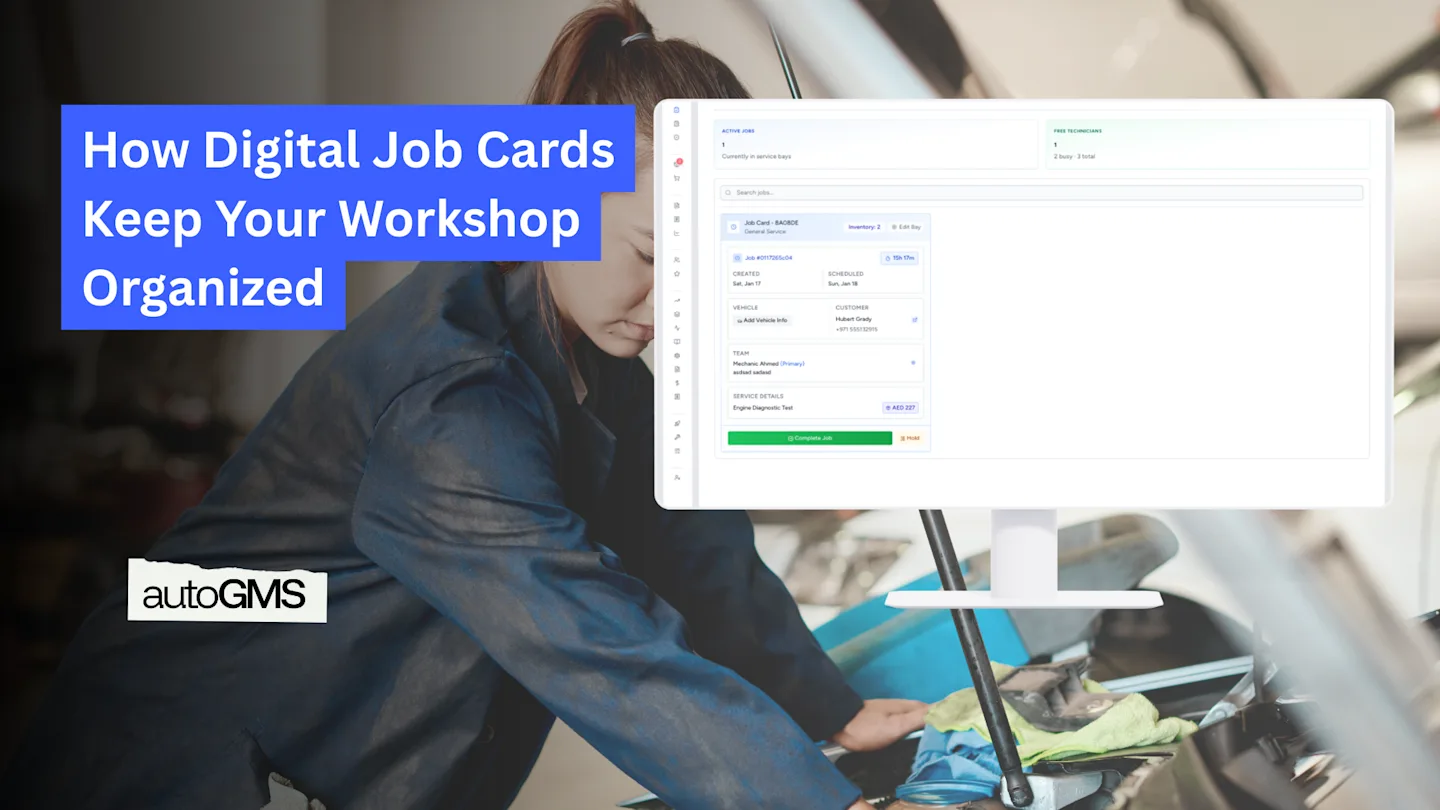
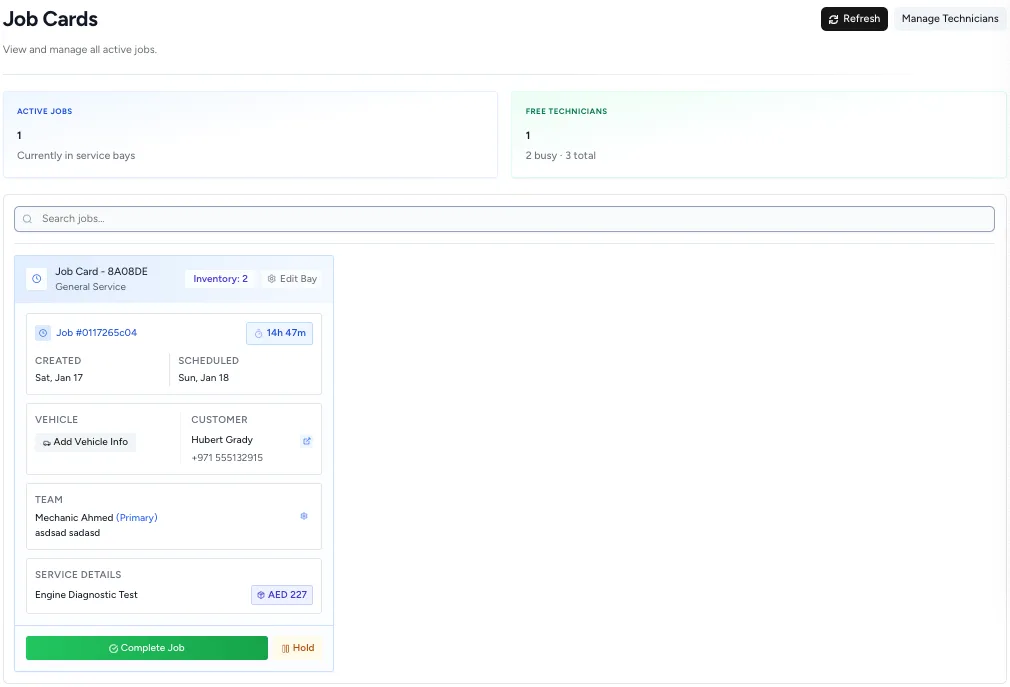
The Job Cards dashboard is the main screen used to manage daily operations.
Here, you can:
See all active jobs in the workshop
Check which bays are occupied
Know which technician is working on what
Spot delays before they become problems
Keep workshop scheduling under control
Understanding Job Statuses Without Guesswork
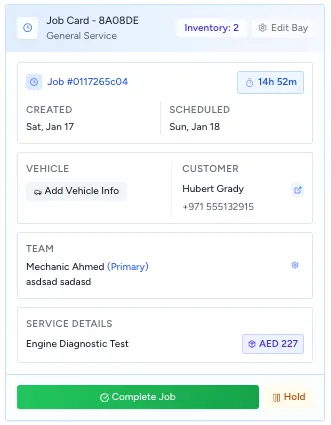
Each job card clearly shows its current status so no one has to ask around.
Common job statuses
In Progress Work has started and the technician is actively working on the vehicle.
On Hold The job is paused, usually because:
A part is missing
Customer approval is needed
An inspection or check is not complete
Completed All work is finished and the vehicle is ready for invoicing or collection.
Jobs cannot be accidentally closed if something important is missing, which protects both the workshop and the customer.
Assigning Jobs to Service Bays
In a real workshop, every job happens in a physical bay. Digital job cards reflect that reality.
Each job card can be linked to a specific service bay so everyone knows where the vehicle is being worked on.
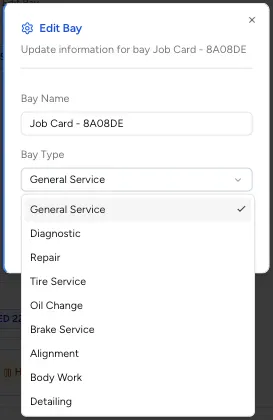
By clicking Edit Bay on a job card, you can define:
The bay name
The type of work being performed in that bay
This helps organize workshop flow and avoid confusion when multiple jobs are active at the same time.
What Bay Information Is Used For
Identifying where the vehicle is located
Matching jobs to the right type of work
Improving workshop scheduling and space planning
Preventing incompatible jobs from blocking the wrong bays
Bay Types Explained
Bay types describe what kind of work the bay is suitable for, such as:
General Service
Diagnostic
Repair
Tire Service
Oil Change
Brake Service
Alignment
Body Work
Detailing
This makes it easier to route jobs correctly and keep the workshop running smoothly.
What You See Inside a Job Card
Opening a job card shows everything needed to complete the job correctly.
This includes:
Customer details
Vehicle information
Scheduled service date
Assigned technician
Service description and price
Before any work starts, this information should be checked to make sure the right job is being done on the right vehicle.
Assigning Technicians and Managing Workload
Each job card shows which technician is responsible for the job.
Technicians see only the jobs assigned to them, helping them stay focused without distractions.
If you click Manage Technicians, the system opens the Team section, where technicians are managed centrally. This is where availability, roles, and access are set.
Any changes made here apply across all job cards and workshop schedules.
Handling Delays Without Losing Control
Delays happen in every workshop. What matters is how they are handled.
When a job cannot move forward, it is marked On Hold instead of being forgotten or closed too early. This keeps the job visible and prevents missed steps.
Common reasons include:
Waiting for parts
Waiting for customer approval
Pending inspection results
This approach keeps workshop scheduling realistic and avoids last-minute surprises.
Parts, Services, and Pricing All in One Place
Digital job cards connect parts and services directly to each job.
This means:
Parts used are logged against the job
Inventory is updated automatically
Service prices are visible before invoicing
Nothing gets missed, and invoices accurately reflect the work done.
Planning Ahead with Calendar and List Views
Workshop scheduling is easier when you can choose how to view your workload.
List view is best for managing live jobs and technician workload. Calendar view is better for planning upcoming bookings across days and time slots.
Switching between the two helps workshops stay organized both now and ahead.
Why Digital Job Cards Make Workshops Run Better
When job cards are digital and consistently used:
Everyone knows what they are working on
Jobs move through bays more smoothly
Delays are visible and controlled
Invoices match the work performed
Workshop scheduling becomes predictable
There is no need for clipboards, whiteboards, or constant check-ins.
Conclusion: Simple Structure, Better Workshop Flow
Job cards may seem simple, but they are the backbone of an organized workshop.
By turning each booking into a clear, digital job card, workshops gain control without adding extra work. Mechanics stay focused, managers stay informed, and customers get better service.
That is what modern booking management software is designed to do — make daily workshop operations simpler, clearer, and more reliable.
Frequently asked questions
What is a digital job card in garage management software?
A digital job card is a live record of a workshop job that tracks the vehicle, service, assigned technician, bay, and job status from start to completion.
How do job cards help with workshop scheduling?
Job cards show which jobs are active, on hold, or completed, helping managers assign bays and technicians efficiently and avoid delays in the workshop.
How do job cards work with booking management software?
Each confirmed booking automatically creates a job card, ensuring service details flow into the workshop without manual entry or paperwork.