Customer Management Software for Garages
Customer management software for garages to manage profiles, track service history, and handle business accounts and fleet invoicing.
On this page
- Customer Management Overview
- Customer Dashboard: Key Metrics at a Glance
- Customer Profiles and Service History
- Searching, Filtering, and Managing Customers
- Business Accounts: Manage your diverse portfolio of business accounts and their fleets
- Business Accounts Dashboard
- Managing Fleets and Business Customers
- Bookings and Invoicing for Business Accounts
- Wrap-Up: Simplifying Customer and Fleet Management
- FAQs
Managing customers efficiently is at the heart of every successful garage. From first-time visitors to long-term clients and fleet partners, having accurate customer data helps teams work faster, communicate better, and deliver more consistent service.
The Customer Management feature in autoGMS gives garages a central place to manage customer profiles, track service history, and monitor booking and revenue activity. It supports both individual customers and business accounts, making it easier to handle everyday jobs as well as larger fleet relationships without relying on spreadsheets or scattered systems.
In this guide, we’ll walk through how customer management works in autoGMS, from customer profiles and service history to business accounts and fleet management, and how each part helps garages stay organized and in control.
Customer Management Overview
Manage your customer relationships and track service history
Customer Management in autoGMS is designed to give garages a complete, up-to-date view of every customer in one place. Instead of switching between booking tools, invoices, and notes, all customer-related information is automatically connected and easy to access.
Each customer profile in autoGMS is linked to key operational data, including bookings, jobs, vehicles, and spending history. This allows front-desk staff and managers to quickly understand a customer’s background, previous services, and activity level before taking the next action.
By centralizing customer information, garages can reduce manual data entry, avoid duplicate records, and ensure that every booking or job is associated with the right customer. This creates a smoother workflow for daily operations and lays the foundation for better reporting, communication, and long-term customer relationships.
Customer Dashboard: Key Metrics at a Glance
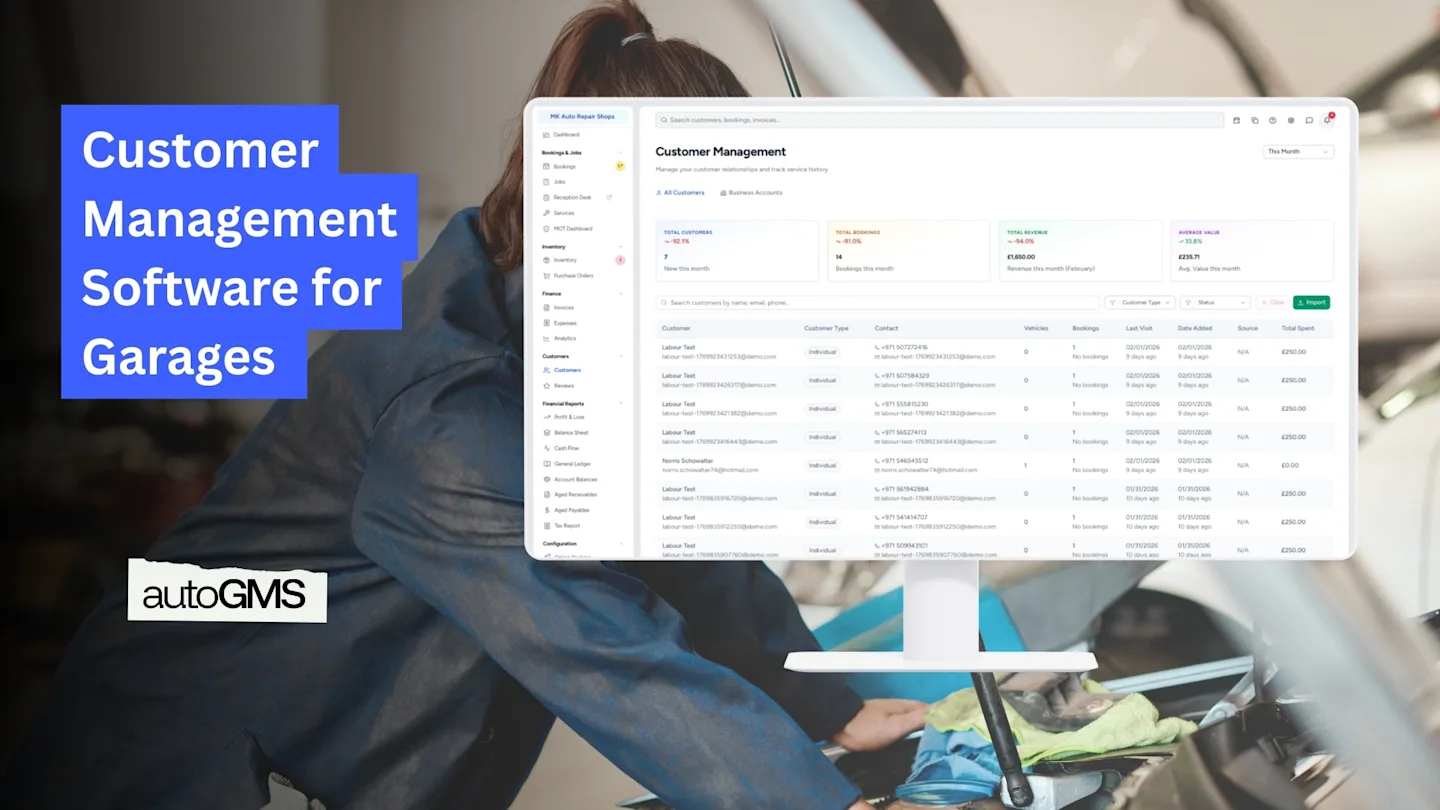
The Customer Dashboard gives garages an instant overview of customer activity and performance without digging into individual records. It highlights the most important metrics needed to understand how customers are interacting with the business.
From this view, you can quickly see:
Total number of customers
Total bookings linked to customers
Total revenue generated
Average customer value
Time-based filters, such as “This Month,” make it easy to review recent performance and spot trends. This is especially useful for comparing customer activity across different periods and identifying changes in demand or spending behavior.
By keeping these metrics visible at all times, the dashboard helps managers make faster decisions and gives reception teams better context when handling bookings or customer inquiries.

Customer Profiles and Service History
Customer profiles in autoGMS give garages a complete view of each customer’s relationship with the business. Instead of relying on notes or memory, all relevant information is stored in one place and updated automatically as work is completed.
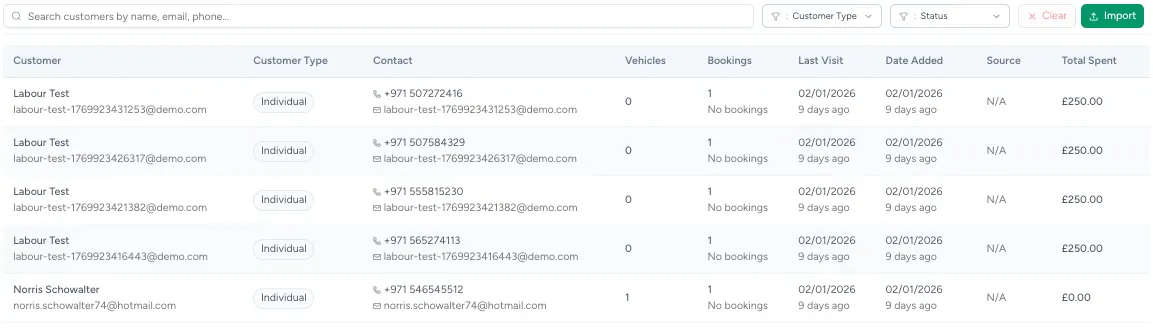
Each customer profile includes essential details such as contact information, customer type, linked vehicles, booking history, last visit, and total spend. This allows staff to quickly understand a customer’s background before creating a booking, opening a job, or discussing recommended services.
Service history plays a key role in delivering better customer experiences. By reviewing previous bookings and visits, garages can provide more accurate advice, maintain consistency in service, and build trust with returning customers. Over time, this data also helps identify loyal customers and track long-term value.
Customer Types: Individual and Business Profiles
autoGMS supports two customer types: individual customers and business accounts. Each customer profile clearly shows its type, allowing garages to handle personal clients and commercial customers using the right workflow.
When opening an individual customer profile, garages can view detailed information such as contact details, customer status, linked vehicles, booking history, total spend, attachments like invoices or documents, and past communications. This ensures that all service and interaction records are stored in one place and easy to access.
By separating customer types while keeping a consistent profile structure, autoGMS helps garages stay organized, avoid data confusion, and manage both one-off customers and long-term business relationships more effectively.
Searching, Filtering, and Managing Customers
As customer records grow over time, being able to quickly locate and manage the right customer becomes essential. autoGMS makes it easy for garage teams to stay organized and in control, even when handling a large number of active customers.
Customer records are structured in a clear, readable list that supports fast decision-making at the front desk. This allows staff to move smoothly between customer profiles, bookings, and service history without disrupting daily workflows.
By keeping customer data easy to access and manage, garages can reduce delays, avoid mistakes, and maintain a consistent service experience across every interaction.
Business Accounts: Manage your diverse portfolio of business accounts and their fleets
Business Accounts in autoGMS are designed for garages that work with companies rather than one-off individual customers. This includes fleet operators, rental companies, and corporate clients that manage multiple vehicles under a single account.
Instead of treating each vehicle or booking as a separate customer, business accounts allow garages to group related vehicles, bookings, and invoices under one business profile. This makes it easier to track activity, manage recurring work, and maintain long-term commercial relationships.
By separating business accounts from individual customers, autoGMS helps garages keep reporting accurate, streamline invoicing, and manage higher-volume clients more efficiently.
Business Accounts Dashboard
The Business Accounts Dashboard gives garages a clear overview of all commercial customers and fleet activity in one place. It is designed to help teams monitor business relationships without having to review individual bookings or invoices one by one.
From this dashboard, garages can quickly see the number of active business accounts, the total number of fleet vehicles, and overall booking and revenue activity linked to business customers. This high-level visibility makes it easier to track B2B performance and identify which accounts generate the most consistent work.
By keeping business account data centralized and easy to review, the dashboard helps garages stay on top of fleet servicing, reduce missed billing opportunities, and manage commercial clients more efficiently.

Managing Fleets and Business Customers
Managing fleet customers requires a clear overview of vehicles, bookings, and service activity across each business account. autoGMS allows garages to group multiple vehicles under a single business profile, making it easier to manage ongoing work and recurring maintenance.
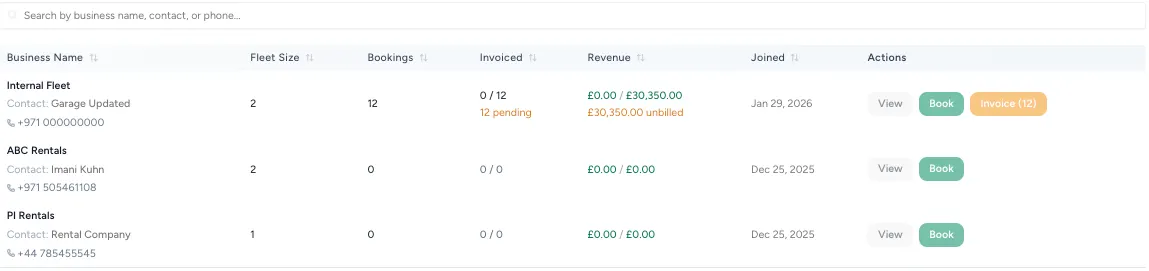
Within each business account, garages can see fleet size, booking history, and service activity at a glance. This structure helps teams understand workload distribution, prioritize fleet servicing, and maintain consistent service standards across all vehicles.
By organizing fleet data at the business level, autoGMS simplifies day-to-day operations and supports long-term relationships with commercial clients who rely on predictable and efficient service.
Bookings and Invoicing for Business Accounts
For business and fleet customers, autoGMS simplifies how bookings and invoicing are handled at scale. Garages can create bookings directly under a business account, allowing multiple vehicles to be scheduled and managed without duplicating customer records.
Fleet bookings are structured to keep services, vehicles, and notes organized, making it easier to coordinate work across several vehicles at once. This is especially useful for recurring maintenance or high-volume service contracts.
On the invoicing side, autoGMS provides clear visibility into invoiced and unbilled work for each business account. Garages can review pending invoices, consolidate services when needed, and ensure that all completed work is accurately billed. This reduces administrative effort, minimizes missed revenue, and supports smoother billing cycles for commercial clients.
Wrap-Up: Simplifying Customer and Fleet Management
Customer Management in autoGMS gives garages a clear, structured way to manage both individual customers and business accounts. By keeping customer profiles, service history, bookings, and invoicing connected, teams can work more efficiently and maintain consistent service across every interaction.
For garages handling fleet or commercial clients, Business Accounts provide the control and visibility needed to manage multiple vehicles, recurring work, and invoicing without added complexity. Together, these features help garages stay organized, reduce admin workload, and support long-term customer relationships as the business grows.
Frequently asked questions
What is the difference between individual customers and business accounts in autoGMS?
Individual customers are personal clients with one or more vehicles, while business accounts are designed for companies managing multiple vehicles under a single profile, such as fleet operators or rental companies.
Can a business account manage multiple vehicles and bookings?
Yes. Business accounts allow garages to group multiple vehicles, manage bookings across the fleet, and track service activity and revenue at the account level.
Does autoGMS keep service history for each customer?
Yes. All bookings and completed services are automatically linked to customer profiles, creating a clear service history that can be accessed at any time.
How does autoGMS help with invoicing for fleet customers?
autoGMS provides visibility into invoiced and unbilled work for each business account, helping garages track pending invoices and ensure completed services are billed accurately.